


Nursa
4.2477.00 Reviews
App Specs
- Version
- 5.1.231
- Updated On
- License
- Free
- Downloads
- 100,000+
- Developer
- Nursa INC
- Categories
- Medical
- Platform
- Android
Screenshots
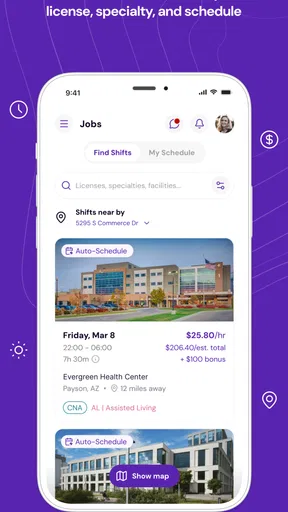
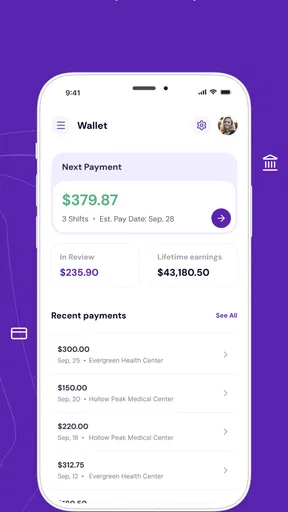
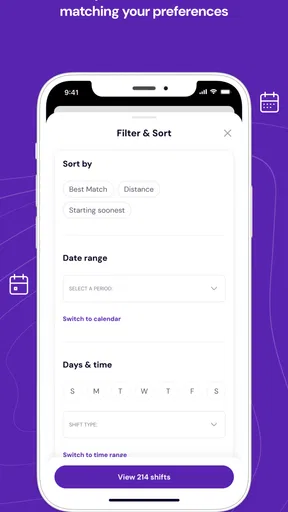
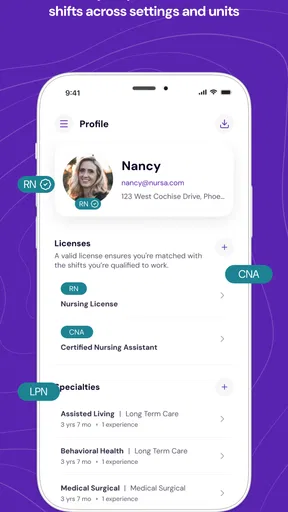
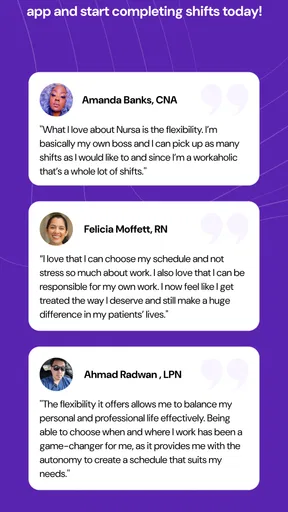
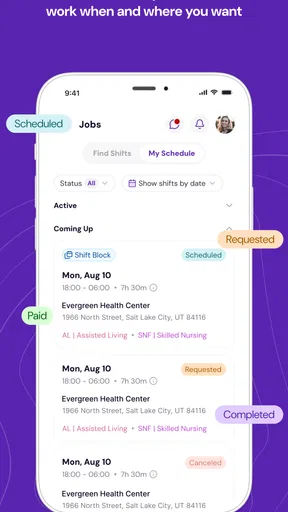
 Analysis by AppCompare
Finding a nursing shift at short notice is usually more complicated than simply checking a calendar. You need the right kind of work, a location you can realistically reach, and enough information to decide whether the shift fits your experience and availability. That is the problem Nursa tries to make easier. Developed by Nursa INC, this free medical app connects nurses with open shifts through a healthcare staffing marketplace, with the practical focus placed on discovering and filling work rather than managing a traditional long-term job search.
I see Nursa as most useful for nurses who want more control over when they work. It is not a replacement for every staffing relationship, and it will not make unsuitable shifts suddenly convenient. Its value is narrower and more useful: it can bring available opportunities into one place so a nurse can look for work around an existing schedule instead of waiting for a facility or agency to call.
Why the shift marketplace matters
The central capability is the ability to find and fill nursing shifts through the app. That sounds straightforward, but the effect on daily planning is significant. A conventional nursing job search often involves contacting several agencies, checking separate messages, or accepting whatever assignment happens to be offered. A marketplace approach reverses that process. I can start with my own availability and then consider the shifts that appear relevant to me.
That difference is especially important for nurses balancing family responsibilities, study, another job, or changing weekly availability. Instead of treating work as one fixed block, the app supports a more flexible way of thinking about shifts. I can use it when I need an additional workday, when a previously open day becomes available, or when I want to explore opportunities without committing to a permanent schedule.
The app belongs in the medical category, but I would not describe it as a clinical tool. It is not intended to replace a medication reference, patient-record system, telehealth service, or professional learning platform. Its purpose is employment coordination. That distinction matters because someone downloading it for clinical guidance would be looking in the wrong place.
At no cost to download, Nursa lowers the barrier to trying this style of staffing search. The Everyone age rating also makes it broadly accessible from a store perspective, although the practical audience is clearly healthcare workers who meet the requirements of the shifts they want to pursue. The app has reached over one hundred thousand installs and holds an average rating of 4.2 from around two thousand ratings, which suggests that many users find the basic concept worthwhile while leaving room for a mixed experience depending on location, role, and available work.
What changes compared with ordinary alternatives
The usual alternative is a direct relationship with a hospital, care facility, or staffing agency. That route can be better when you want predictable scheduling, a familiar workplace, or a person who knows your background. It may also provide clearer continuity than browsing individual openings. Nursa is more appealing when flexibility matters more than having one fixed source of assignments.
Worth Reading Before You Choose

EA SPORTS FC Mobile 26 Is a Bigger Football Game, but It Takes Time

Flipboard Shows What News Apps Must Do Beyond the Feed

Switching to Android Auto Means Rethinking Your Driving Routine

Google Calendar Makes a Crowded Week Easier to Manage

Ludo King Makes the Most of the Minutes Between Plans

Baby Panda World Brings Quick Play to Modern Phones, but Its Game Library Feels Busy
Another alternative is searching through general employment websites. Those services may contain permanent positions, broad healthcare vacancies, and administrative roles, but they are not built around the immediate question of which nursing shifts fit a particular availability window. Nursa’s narrower focus is its advantage here. I would rather use it for shift-oriented searching than sort through a large general job board that treats short-term nursing work as just another listing type.
The trade-off is that a focused marketplace cannot guarantee that the right opportunity will always be available. A general job board may offer more variety across employment types, while a direct employer may offer more certainty. Nursa makes the most sense when the user values choice and responsiveness and accepts that the marketplace may not match every preference at every moment.
How I would use it in practice
I would begin by treating the app as a planning tool rather than an emergency promise. Before browsing, I would decide which days I can genuinely work, how far I am willing to travel, and what kind of assignment fits my professional experience. That preparation prevents a common mistake: becoming interested in a shift before checking whether the timing and commute make it realistic.
When reviewing an opportunity, I would look beyond the headline. The important question is not simply whether a shift is open, but whether accepting it would create problems later. A convenient start time may still be unsuitable if the end time conflicts with another commitment. A location that looks manageable on a map may become impractical during a busy commute. A shift that pays attention immediately may not be worth accepting if it does not match the kind of work I am prepared to do.
This is one of the less obvious strengths of using a marketplace: it encourages nurses to compare opportunities instead of automatically accepting the first available option. I can think in terms of fit, not just availability. That is a healthier workflow for anyone who has enough flexibility to choose.
I would also keep my professional information ready before using the app seriously. A shift marketplace works best when the user can move efficiently from browsing to evaluating and then to filling a suitable opening. If I have to stop repeatedly to find basic employment or credential details, the convenience of the app is reduced. The practical tip is simple: prepare the information and preferences that are likely to matter before I begin looking for work.
Another useful habit is checking the app at the times when my schedule changes, rather than opening it only when I suddenly need income. Regular, brief checks can make it easier to notice possibilities and compare them calmly. That does not mean constantly monitoring the phone. It means using Nursa as part of weekly planning, where an open day can be matched with an appropriate shift before it becomes a last-minute decision.
A realistic everyday scenario
Imagine a nurse whose regular schedule leaves one weekday open because a class has been postponed. Calling several staffing contacts might take time, and a general job site may be filled with permanent roles that do not suit that single day. With Nursa, the nurse can use the newly available day to look for a shift, consider the location and timing, and decide whether the opportunity is practical.
The important benefit is not just speed. It is the ability to turn an uncertain day into a deliberate choice. If the available shift requires an exhausting commute or does not suit the nurse’s experience, the nurse can reject it instead of feeling pressured by one limited option. If a suitable opening appears, the app provides a more direct path toward filling that shift than starting a broad search from scratch.
I can also see the same workflow helping a nurse who wants occasional extra work without changing a primary job. The app becomes a way to look for additional shifts around the existing commitment. That flexibility is valuable, but it requires discipline. The user still has to protect rest time and avoid treating every open calendar space as an obligation to work.
Where the experience can become frustrating
The marketplace model depends on the quality and relevance of the opportunities visible to each user. If the available shifts do not match a person’s location, role, schedule, or professional preferences, the app may feel less useful than its concept suggests. This is not a flaw unique to Nursa; it is an unavoidable trade-off of flexible staffing platforms. More choice is helpful only when the choices are genuinely usable.
I would also avoid assuming that a listing removes the need for judgment. The app can help surface an opportunity, but it cannot make the commute shorter, replace professional responsibility, or guarantee that a shift will feel comfortable once the nurse arrives. Users should still evaluate every assignment carefully and make sure it fits their qualifications and personal limits.
There is also a psychological trade-off. A direct employer relationship can feel more stable because the nurse knows whom to contact and what kind of work to expect. A marketplace can feel more transactional. That may be exactly what an independent worker wants, but it may disappoint someone looking for mentorship, a fixed team, or a long-term workplace identity.
For that reason, I would not recommend relying on Nursa alone if predictable hours are the main priority. A permanent position, a regular facility arrangement, or a trusted agency may be a better foundation. Nursa is stronger as a flexible option alongside other work arrangements than as an automatic answer to every employment need.
Small workflow decisions that make a difference
One practical insight is to separate “available” from “worth accepting.” Nurses often have a narrow window in which they can work, and it is tempting to treat any matching shift as a success. I would instead rank opportunities by total effort: travel, preparation, length of the commitment, and how well the work fits my current energy and responsibilities. This approach helps prevent flexible scheduling from becoming inefficient scheduling.
A second insight is to use the app for comparison, not only discovery. Even if I already know I want to work on a particular day, seeing the available possibilities can help me decide whether taking a shift is sensible. If the options are inconvenient, I may choose to keep the day free or pursue a different route. That ability to make an informed “not this time” decision is part of the app’s value.
A third insight is that flexibility works best when boundaries are set in advance. I would decide the maximum travel time, the types of shifts I am comfortable considering, and the days I need to keep free. Without those rules, a marketplace can encourage reactive decisions. With them, browsing becomes faster and the final choice becomes easier to defend.
Finally, I would treat notifications and app checks as prompts, not commands. A new opportunity can be useful, but urgency should not replace careful review. The best result comes when the app supports a nurse’s plan rather than constantly disrupting it.
Who benefits most from Nursa
Nursa is particularly well suited to nurses who already understand their own scheduling needs and want a more flexible way to find work. It may be a strong fit for people seeking occasional shifts, additional income, or alternatives to a fixed weekly pattern. Nurses who are comfortable comparing assignments and making independent decisions are likely to get more from it than someone who wants every detail handled by a dedicated staffing contact.
It can also suit experienced professionals who know which environments and schedules work for them. That knowledge makes the marketplace easier to navigate because the user can quickly filter out poor matches mentally, even before spending much time on them. Flexibility becomes more valuable when the nurse has clear standards.
On the other hand, I would be cautious about recommending it as the first choice for someone entering healthcare employment and needing extensive guidance. A new worker may benefit more from a structured employer, personal recruiter, or workplace that provides a clear onboarding path. The app may help locate opportunities, but independent shift selection requires a level of confidence and self-management that not everyone has at the beginning.
It is also not the ideal choice for a nurse whose priority is one stable workplace with consistent colleagues. In that situation, the traditional route may offer more continuity. Nursa’s strength is movement between opportunities, not necessarily attachment to one team.
Device details and day-to-day expectations
The current version is 5.1.167, and the app supports devices running Android 7.0 or later. That gives it a reasonably broad Android reach, including older phones that some newer apps leave behind. I would still keep the device updated when possible, particularly because a staffing app is more useful when it opens reliably during a busy scheduling moment.
The free price makes experimentation straightforward. A nurse can see whether the marketplace fits their working style without paying for access first. That does not remove the need to consider the real costs of accepting a shift, such as transport, time, and fatigue, but it does make the initial decision less risky.
The rating of 4.2 is encouraging without suggesting that every user will have an identical experience. Staffing apps are unusually dependent on local conditions and individual circumstances. One nurse may find several useful opportunities, while another may find the marketplace less relevant. I would judge the app after testing whether the openings and workflow fit my own area and routine, rather than relying on the rating alone.
My recommendation after using the concept as intended
I like Nursa because it focuses on a real problem: nurses often need work that fits around their lives, not only a job that dictates the entire schedule. Its marketplace approach gives users a more active role in finding shifts, and that can be empowering when the person has clear availability and professional preferences.
My recommendation comes with a boundary. I would use it as a flexible staffing channel, not as a guarantee of steady employment and not as a substitute for careful professional judgment. I would compare each shift against travel, timing, experience, and recovery time, and I would keep another employment option available if consistent hours matter.
For nurses who want occasional or adjustable work, the app is worth trying. For people seeking a permanent team, predictable routines, or close personal support from a recruiter, a direct employer or traditional agency may be better. The real strength of Nursa is not that it removes every staffing problem; it gives nurses more control over which opportunities deserve their attention.
That makes it a practical medical employment app rather than an all-purpose nursing companion. With its free access, broad Everyone rating, and focused shift marketplace, it offers a useful alternative to scattered calls and general job searches. I would recommend it most confidently to independent nurses who are ready to evaluate opportunities for themselves and use flexibility deliberately.
Pros
- Helps nurses find flexible shifts that fit changing schedules.
- Clear shift details make it easier to compare available opportunities.
- Useful location filters can reduce time spent searching nearby facilities.
- In-app messaging supports communication with facilities before accepting shifts.
- Can help healthcare professionals discover work outside their usual employer.
Cons
- Availability may vary greatly depending on your city and specialty.
- Some shifts may require credentials or documents to be verified first.
- Last-minute cancellations or schedule changes can disrupt planning.
- The app may not replace a stable income or guaranteed weekly hours.
- Users should carefully review facility ratings and shift conditions before accepting.
FAQs for Nursa
What is Nursa, and who is the app designed for?
Nursa is a healthcare staffing app that connects qualified nurses and other healthcare professionals with available shifts at hospitals, clinics, nursing facilities, and other care settings. It is primarily designed for licensed healthcare workers seeking flexible, per-diem work, while facilities use it to find staff coverage. Availability and supported professional roles may vary depending on location.
Do I need a professional license or specific qualifications to use Nursa?
Yes. Nursa is intended for verified healthcare professionals, so you generally need an active license, relevant credentials, and other documentation required for the shifts you want to accept. The app may ask you to complete identity, license, background, vaccination, training, or facility-specific checks. Approval is not automatic, and requirements can differ by state, profession, and healthcare facility.
How do shifts work in Nursa, and can I choose when to work?
After creating and verifying your profile, you can browse available shifts by location, date, facility, specialty, and other details. You can review the expected hours, pay information, and requirements before requesting or accepting a shift. Nursa offers flexibility, but shift availability depends on local demand, your credentials, and facility approval, so consistent work is not guaranteed.
How and when do healthcare professionals get paid through Nursa?
Payment details can vary according to the shift, facility, location, and Nursa’s current policies. Before accepting work, users should carefully review the displayed compensation, shift terms, and any applicable payment conditions. Once a shift is completed and approved, payment is generally processed through the platform using the payment method connected to the account. Always verify the latest terms in the app.
Is Nursa available everywhere, and are there any costs to download or use it?
Nursa’s availability depends on the country, state, city, healthcare profession, and participating facilities. The app itself may be free to download, but users should review the current terms for any service conditions, account requirements, or other charges that could apply. Before relying on the platform for employment, confirm that your area and credentials are supported and that suitable shifts are listed.


